

前提
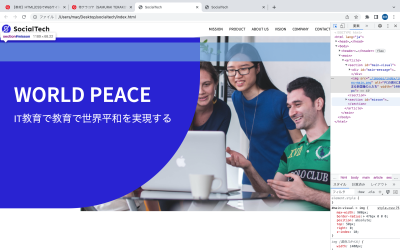
1,オンラインスクールでHTML/CSSを学んで1週間目なのですが,教材通りのサイトを作りたいが,指定されたmx-widghなどの値をコピペしても教材通りの表示にならず,細かく調整してしまいます.
理由がわかりません
2,セクションが二つあり,二つ目を作成すると,なぜか1つ目のセクションに重なって表示されません.
実現したいこと
上記の解決
該当のソースコード
HTML
<!DOCTYPE html> <html> <head> <meta charset="UTF-8"> <meta http-equiv="X-UA-Compatible" content="IE=edge"> <meta name="decscriptipon" content="プログラム王に俺はなる"> <meta name="viewport" content="width=device-width, initial-scale=1.0"> <link rel="stylesheet" href="./style.css"> <title>SocialTech</title> </head> <body> <header> <a href="./index.html" id="logo"><img src="./images/logo.png" alt="トップページへ"></a> <nav id="nav-pc"> <a href="mission.html">MISSION</a> <a href="product.html">PRODUCT</a> <a href="index.html#aboutus">ABOUT US</a> <a href="index.html#vision">VISION</a> <a href="index.html#company">COMPANY</a> <a href="index.html#contact">CONTACT</a> </header> </nav> <main> <article> <section id="main-visual"> <div id="main-message"> <h1> WORLD PEACE </h1> <p> IT教育で教育で世界平和を実現する </p> </div> <img src="./images/index/index-main.png" alt="PCの周りに集まる多国籍の人たち" width="1400px" > </section> <br> <section id="mission"> <h2 class="index-h2">MISSION</h2> <div id="mission-flex"> <div> </div> <div> </div> </div> </section> </article> </main> </body> </html>
CSS
body { font-family: "Source Sans Pro", "Hiragino Kaku Gothic ProN", Meiryo, Arial, sans-serif;} p { font-size: 15px;} body{ max-width: 1900px; max-height: 960px; margin: 0 auto 0 auto;} header{ display: flex;justify-content: space-between; }#nav-pc { text-align: right; font-size: 14px; padding-top: 15px; } #nav-pc > a { text-decoration: none; margin-left: 20px;}#nav-pc > a:link { color: #0d0d0d;}#nav-pc > a:visited { color: #0d0d0d;}#nav-pc > a:hover { color: #0d0d0d; text-decoration: underline;}#nav-pc > a:active { color: #0d0d0d;} #mainvisual{ position: relative; height: 400px;} #main-message { position: absolute; top: 55px; left: 1oopx; background-color: #2710d5; color: #ffffff; border-radius: 0 0 476px 0; max-width: 720px; height: 65%; width: 100%; z-index: 11;} #main-message > h1{ font-size: 80px; margin: 150px 0 0 50px; } #main-message > p{ font-size: 36px; margin: 0 0 0 50px; } #main-visual > img { max-width: 900px; border-radius: 476px 0 0 0; position: absolute; top: 50px; right: 0; z-index: 10;} .a{ position: absolute;top: 700px;}



0 コメント