

実現したいこと
・AngularでWebアプリをお試しで作っています。
・バックエンドから取得したデータをAngular MaterialのMatTableで一覧表示させようとしています。
・ボタンクリックを起点にバックエンドからデータを取得してMatTableで表示させるデータを保持している配列OrderModelに値を追加しました。追加後にどうにかしてテーブルを更新(取得したデータを含めて一覧表示)したいのですがうまくいかず困っています。
アドバイスいただけますと幸いです。
画面イメージ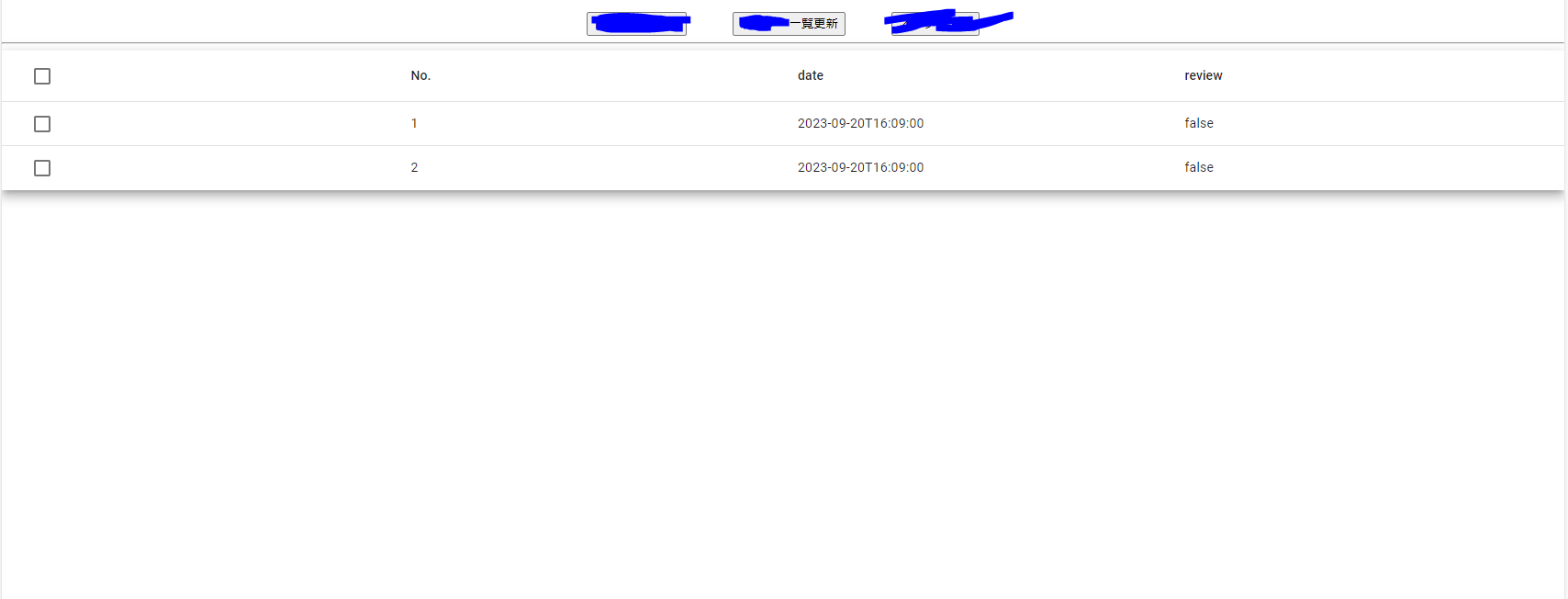
↑一覧更新ボタン押下でバックエンドからデータを取得して一覧を更新するイメージ
試したこと
・初学者であまり知識がない点ご理解ください。
・バックエンドから値を取得して配列OrderModelに追加できていることはconsole.logにて確認済みです。
試したこと①
下記のようにバックエンドからのデータを配列OrderModelに追加後にテーブルの更新?をしようと試みましたがエラーが出てしまいました。(よく理解できていません。)
setOrderitems(message: any) { this.orderitems = message; for (this.i = 0; this.i < this.orderitems.length; this.i++) { this.ORDER_DATA.push(this.orderitems[this.i]); } //↓テーブル更新? this.dataSource = new MatTableDataSource<OrderModel>(this.ORDER_DATA); }
↓エラー
TS2740: Type 'MatTableDataSource<OrderModel, MatTableDataSourcePaginator>' is missing the following properties from type 'OrderModel[]': length, pop, push, concat, and 27 more.
試したこと②
routerを使用してページを再読み込みしてみました。
setOrderitems(message: any) { this.orderitems = message; for (this.i = 0; this.i < this.orderitems.length; this.i++) { this.ORDER_DATA.push(this.orderitems[this.i]); } //↓ページ全体の再読み込み this.refresh() } refresh(): void { this.router.navigateByUrl('/order', { skipLocationChange: true }).then(() => { console.log(decodeURI(this._location.path())); console.log('aaaa'); this.router.navigate([decodeURI(this._location.path())]); }); }
コード全体
order.component.ts
import { Component } from '@angular/core'; import { SelectionModel } from '@angular/cdk/collections';//チェックボックスように追加 import { MatTableDataSource } from '@angular/material/table'; import { MatDialog, MatDialogConfig } from '@angular/material/dialog'; import { DialogComponent } from '../dialog/dialog.component'; import { DeletedialogComponent } from '../deletedialog/deletedialog.component'; import { Router } from '@angular/router'; import { Location } from '@angular/common'; export interface OrderModel { date: string; id: number; reviewFlag: boolean; select?: boolean; } @Component({ selector: 'order-component', templateUrl: './order.component.html', styleUrls: ['./order.component.css'] }) export class OrderComponent { ORDER_DATA: OrderModel[] = [{ id: 3, date: '2023-09-20T16:09:00', reviewFlag: false }]; i = 0; orderitems: any; //dialog.componentからオーダー情報を受け取るメソッド setOrderitems(message: any) { this.orderitems = message; for (this.i = 0; this.i < this.orderitems.length; this.i++) { this.ORDER_DATA.push(this.orderitems[this.i]); } console.log(this.ORDER_DATA); //this.dataSource = new MatTableDataSource<OrderModel>(this.ORDER_DATA); //this.update(); //this.refresh() } columnName = ['select', 'id', 'date', 'reviewFlag']; dataSource = this.ORDER_DATA; selection = new SelectionModel<OrderModel>(true, []); // i!: number; checkednum!: number;//チェックを入れたオーダー番号を保持する。 /** 表示されているすべてのオーダーにチェックが入っているかどうかを判定する */ isAllSelected() { const numSelected = this.selection.selected.length;//①選択されているチェックボックスの数 // for (this.i = 0; this.i < this.selection.selected.length; this.i++) {}; const numRows = this.dataSource.length;//②表示されているオーダー(チェックボックス)の数 return numSelected == numRows;//①=②であればすべてのチェックボックスにチェックが入っている } /** Selects all rows if they are not all selected; otherwise clear selection. */ masterToggle() { this.isAllSelected() ? this.selection.clear() ://すべてのチェックボックスを選択していれば押下時に全チェックを外す。 this.dataSource.forEach(row => this.selection.select(row));//一部のみにチェックが入っていれば押下時にすべてにチェックを入れる } //押されたオーダーのidを保持する setOrder(n: number) { this.checkednum = n; console.log(this.checkednum); } //dialog機能 constructor(public _matdialog: MatDialog, private router: Router, public _location: Location) { } openDialog() { const dialogConfig = new MatDialogConfig(); // 表示するdialogの設定 dialogConfig.disableClose = true; dialogConfig.id = "modal-component"; dialogConfig.height = "150px"; dialogConfig.width = "400px"; const modalDialog = this._matdialog.open(DialogComponent, dialogConfig); } openDeletedialog() { const dialogConfig = new MatDialogConfig(); // 表示するdialogの設定 dialogConfig.disableClose = true; dialogConfig.id = "modal-component"; dialogConfig.height = "150px"; dialogConfig.width = "400px"; const modalDialog = this._matdialog.open(DeletedialogComponent, dialogConfig); } //リンクを入れる変数 count = 1; ngOnInit() { this.count = this.ORDER_DATA.length; } refresh(): void { this.router.navigateByUrl('/order', { skipLocationChange: true }).then(() => { console.log(decodeURI(this._location.path())); console.log('aaaa'); this.router.navigate([decodeURI(this._location.path())]); }); } }
order.component.html
<div class="block-header"> <p>オーダー一覧</p> </div> <div class="button"> <div class="toreviewbutton"> <!-- オーダーが1つ以上ある場合 --> <div class="button1" *ngIf="count>0"> <button igxButton="outlined" routerLink="/review"> レビュー画面へ </button> </div> <!-- オーダーが0の場合 --> <div class="button2" *ngIf="count==0"> <button igxButton="outlined" routerLink="/order"> レビュー画面へ </button> </div> </div> <!-- オーダー更新ボタン --> <div class="databutton"> <button igxButton="outlined" (click)="openDialog()"> オーダー一覧更新 </button> </div> <!-- 削除ボタン --> <div class="deletebutton"> <button igxButton="outlined" (click)="openDeletedialog()"> オーダー削除 </button> </div> </div> <hr> <div class="example-container mat-elevation-z8"> <mat-table [dataSource]="dataSource"> <!-- Checkbox Column --> <ng-container matColumnDef="select"> <!-- ヘッダー部分のチェックボックス --> <!--checked:チェックボックスが☑されたかどうかを設定する。 --> <!--change:チェックボックス状態が変更されたあとに発生するイベント。checkedへの参照を提供する。 --> <!--indeterminate:不確定状態における挙動を設定する。クリックすると解除される。 --> <mat-header-cell *matHeaderCellDef> <mat-checkbox (change)="$event ? masterToggle() : null" [checked]="selection.hasValue() && isAllSelected()" [indeterminate]="selection.hasValue() && !isAllSelected()"> </mat-checkbox> </mat-header-cell> <!-- オーダー部分のチェックボックス --> <mat-cell *matCellDef="let row"> <mat-checkbox (click)="$event.stopPropagation()" (change)="$event ? selection.toggle(row) : null " [checked]="selection.isSelected(row)"> </mat-checkbox> </mat-cell> </ng-container> <ng-container matColumnDef="id"> <mat-header-cell *matHeaderCellDef> No. </mat-header-cell> <mat-cell *matCellDef="let order"> {{order.id}} </mat-cell> </ng-container> <ng-container matColumnDef="date"> <mat-header-cell *matHeaderCellDef> date </mat-header-cell> <mat-cell *matCellDef="let order"> {{order.date}} </mat-cell> </ng-container> <ng-container matColumnDef="reviewFlag"> <mat-header-cell *matHeaderCellDef> review </mat-header-cell> <mat-cell *matCellDef="let order"> {{order.reviewFlag}} </mat-cell> </ng-container> <mat-header-row *matHeaderRowDef="columnName"></mat-header-row> <mat-row *matRowDef="let row; columns: columnName;" (click)="selection.toggle(row)&& setOrder(row)"></mat-row> </mat-table> </div>



0 コメント